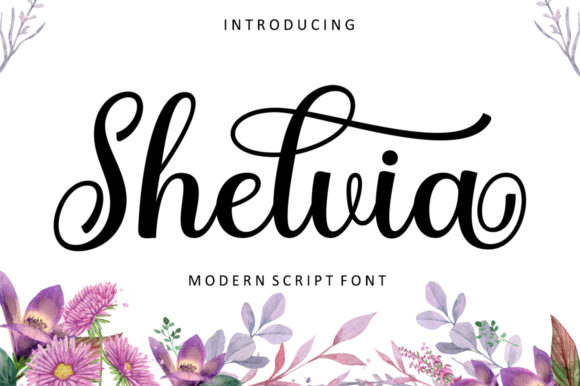
Shelvia Font for Elegant Web Design
As a web designer, choosing the right font can make all the difference in how your content is perceived. Shelvia, a beautifully crafted script font from Script Amp, brings an air of elegance and sophistication to any digital project. Its flowing curves and handwritten feel make it ideal for creating visually appealing designs that resonate with users.
Visual Characteristics and Style
Shelvia has a distinct personality that sets it apart from other fonts. It features soft, cursive strokes that give it a natural, organic look. This makes it perfect for adding a touch of creativity and warmth to your website or app. The font's design is reminiscent of hand-written notes, which can be especially effective for wedding invitations, thank you cards, and other personal communications.
The visual appeal of Shelvia lies in its balance between legibility and style. While it is a script font, it maintains enough clarity to be readable on both desktop and mobile screens. This versatility allows it to be used in various contexts without compromising on aesthetics.
Applications in Web Design
When designing a website, the choice of font plays a crucial role in establishing brand identity and user experience. Shelvia can be used effectively in several areas:
- Website Headers: Using Shelvia for headers can add a unique flair to your site’s navigation bar or main title. It works well for creative portfolios or boutique online stores where a more artistic approach is desired.
- Hero Sections: A hero section with a bold, eye-catching headline using Shelvia can draw attention and create an emotional connection with visitors.
- Landing Pages: Incorporating Shelvia into call-to-action buttons or key messages can enhance the overall appeal of landing pages, making them more engaging and persuasive.
- Blog Graphics: For blog posts or articles, Shelvia can be used as a decorative element in headers or sidebars to add visual interest without distracting from the content.
- Digital Ads: In digital advertising, Shelvia can help convey a sense of trust and professionalism while maintaining a friendly tone that resonates with the target audience.
Readability and Visual Hierarchy
One of the most important aspects of using any font in web design is ensuring readability. Shelvia, despite being a script font, is designed with clear letterforms that maintain legibility even at smaller sizes. This makes it suitable for use in headlines, subheadings, and other elements that require quick scanning.
When incorporating Shelvia into your design, it's essential to consider visual hierarchy. Pairing it with a simpler sans serif font for body copy can help guide the reader’s eye through the content smoothly. This combination not only enhances readability but also adds depth to the overall design.
For instance, using Shelvia for section headings and a clean sans serif font like Helvetica or Arial for body text can create a balanced layout that is both aesthetically pleasing and easy to navigate.
Brand Tone and User Engagement
The choice of font can significantly influence the tone of your brand. Shelvia’s elegant and flowing appearance conveys a sense of professionalism and creativity. This makes it particularly suitable for brands that want to communicate a refined yet approachable image.
By using Shelvia consistently across different design elements, you can establish a strong brand identity that is instantly recognizable. Whether it's for a coaching website, a product landing page, or a course sales page, this font helps reinforce the brand's message and values.
Additionally, the use of Shelvia can enhance user engagement by creating a more inviting and visually appealing interface. Users are more likely to interact with content that feels personal and thoughtfully designed.
Practical Tips for Using Shelvia
To ensure optimal performance and usability, here are some practical tips when working with Shelvia:
- Check File Formats: Make sure to download the appropriate file formats (such as TTF, OTF, or WOFF) to ensure compatibility across different platforms and devices.
- Consider Responsive Layouts: Test how Shelvia looks on various screen sizes, including mobile devices. Adjust spacing and sizing as needed to maintain readability.
- Font Pairing: Experiment with pairing Shelvia with complementary fonts to achieve a harmonious design. A simple sans serif font for body text often works well.
- Commercial Licensing: If you're using Shelvia for client projects, online stores, or digital templates, ensure that you have the proper commercial license to avoid any legal issues.
With its elegant design and versatile applications, Shelvia is a valuable addition to any designer's toolkit. Whether you're working on a creative portfolio, an online store, or a branding project, this font can help elevate your designs and leave a lasting impression on your audience.